1. Why this post?
In the What is MPLS post and the LDP post, the labels were distributed by LDP. OSPF found the path, and LDP put labels on top of that path. In this post we remove LDP completely from the same core and give the job of distributing labels to OSPF itself. It’s called Segment Routing (SR).
The label on the packet is still the same MPLS label. Push, swap and pop are still the same. That’s why the full name of what this post covers is SR-MPLS. There is also SRv6, which works with the IPv6 header, but I’m not going into it in this post.
In this lab the MPLS forwarding logic doesn’t change at all. What changes is how the labeled paths are built: we use SR-MPLS instead of LDP. But don’t take this as the definition of Segment Routing. The real SR architecture goes further: the source router can define the path a packet will follow by stacking segments one after another. In this post we stay with a single segment, that is, OSPF’s shortest path. We’ll get to path selection later in the series.
This post is a continuation of the “MPLS from Scratch” series. I explain the commands on Nokia, because Nokia’s tunnel table shows LDP and SR tunnels side by side and the difference is very easy to see. The Cisco and Huawei equivalents are in section 9. In the next post we’ll run a VPRN over SR tunnels instead of LDP.
At the end of the post there are ready-made labs that open in your browser: three single-vendor ones and one that mixes three vendors.
At a glance
What this post is about, in one sentence: with LDP, labels are agreed separately between each pair of neighbors. With SR, every destination’s number comes written on the map OSPF already distributes. Nobody has to ask anybody.
| The trouble with LDP | What fixes it in SR |
|---|---|
| A second protocol, a separate session with every neighbor | LDP goes away completely, the number arrives in OSPF’s own messages |
| OSPF moves to a new path but the LDP label hasn’t arrived on it yet, traffic drops | No second protocol to wait for: the SID information arrives in the same OSPF messages as the route |
| Numbers are random and differ at every hop | The number is fixed: 16004 means PE2 everywhere |
- Label = SRGB base + index. With base 16000 and PE2’s index 4, the label is 16004. In the Nokia lab the base is 20000, so it’s 20004.
- The SRGB doesn’t change the path.
sr-labels 20000–27999doesn’t tell traffic “travel in this area”. It only reserves a number range for SR in the router’s label pool. The path is still OSPF’s shortest path. - Why is it used? Fewer protocols and failure sources, a backup path ready in advance when a link breaks (TI-LFA), traffic engineering without RSVP-TE.
The details are below.
2. What was missing in LDP?
LDP works, and most service providers lived with it for years. But it has a few well-known problems:
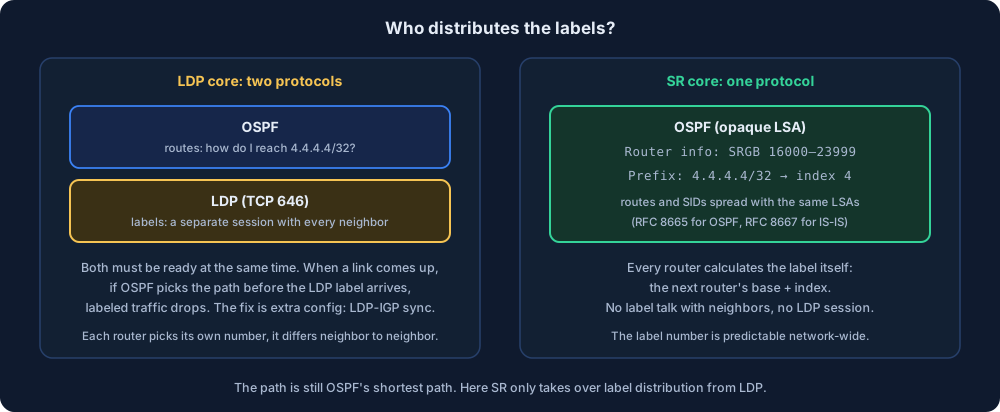
- A second protocol. Next to OSPF, a separate LDP session (TCP 646) is opened with every neighbor. Configuration, monitoring and failure sources double.
- The sync problem with the IGP. When a link comes up, OSPF moves the path onto that link right away. If the LDP labels haven’t arrived on that link yet, labeled traffic drops for a few seconds. There’s a separate setting just for this: LDP-IGP synchronization.
- Labels are local. Every router picks its own number for the same destination. When you see 42 on a packet, you have to look at that router’s table to understand where it’s going.
- You can’t choose the path. LDP only follows the IGP’s shortest path. To send traffic over a different path you need a third protocol called RSVP-TE.
SR solves the first three directly. It solves the fourth one too (SR-TE), but that’s not the topic of this post.
3. Analogy: a number on the map
OSPF gives every router a map of the network: who is where, which way to go. Think about where the label comes from using that map:
- With LDP the map only has roads, no numbers. Every router separately calls its neighbor and asks: “Which number should I use to hand you a packet going to 4.4.4.4?” One neighbor says “give it to me with 42”, the next says “with 17”. Every pair of neighbors opens its own phone line (an LDP session), and everyone picks their numbers themselves.
- With SR OSPF also writes a number next to every loopback while distributing the map: “4.4.4.4 → 4”. Since everyone sees the same map, everyone calculates the label themselves: 16000 + 4 = 16004. Nobody calls anybody.
| On the map | In SR | What it’s for |
|---|---|---|
| The map | IGP (OSPF or IS-IS) | Distributes the roads and the numbers to everyone |
| The number next to the loopback (4) | SID index | The destination’s fixed, network-wide number |
| Where the counting starts (16000) | SRGB | The label range the router reserves for SR |
| The number on the packet (16004) | Label | The real MPLS label: base + index |
One subtlety: every router counts from the start of its own range. If the ranges are different (one at 16000, one at 20000), the number on the packet changes hop by hop, but the number on the map is still 4. We’ll see this in section 10.
4. Three concepts: SID, SRGB, node SID
Segment and SID. In SR, a “segment” means an instruction. “Go to this address along the shortest path” is a segment. The number of this instruction is called a SID (Segment Identifier). There are two kinds you’ll use most often:
- Prefix SID: A SID bound to a prefix. “Go to 4.4.4.4/32 along the shortest path.” It is valid across the whole network.
- Adjacency SID: A SID bound to a link. “Exit through this link.” It only has meaning on that router. It’s used for choosing paths (SR-TE), not in this post.
Node SID. A prefix SID given to a router’s loopback is called a node SID, because it represents that router. The loopback is chosen because it isn’t tied to any physical link, it stays up as long as the router is up. All the SIDs in this post are node SIDs.
SRGB (Segment Routing Global Block). The label block the router reserves for SR. A SID is usually given as an index, and the real label is calculated like this:
label = SRGB base of the router that will read the packet + index
There are four routers in the lab, and each router’s loopback was given its own number as the index:
| Router | Loopback | Index | Label with SRGB 16000 |
|---|---|---|---|
| PE1 | 1.1.1.1 | 1 | 16001 |
| P1 | 2.2.2.2 | 2 | 16002 |
| P2 | 3.3.3.3 | 3 | 16003 |
| PE2 | 4.4.4.4 | 4 | 16004 |
Two rules:
- Indexes must be unique across the network. If two loopbacks get the same index there’s a conflict and one of them is left without a SID (we’ll try this on purpose in section 11). That’s why the SID plan is usually kept centrally in a table.
- Keep the SRGBs the same. They can be different, it works, but then the label changes at every hop and gets harder to read. On Cisco and Huawei the default block is 16000–23999. On Nokia you define the block yourself.
5. The packet’s journey: LDP and SR side by side
Think of a packet going from PE1 to PE2’s loopback (4.4.4.4). The path is the same in both cases: PE1 → P1 → P2 → PE2. The difference is in the numbers on it.
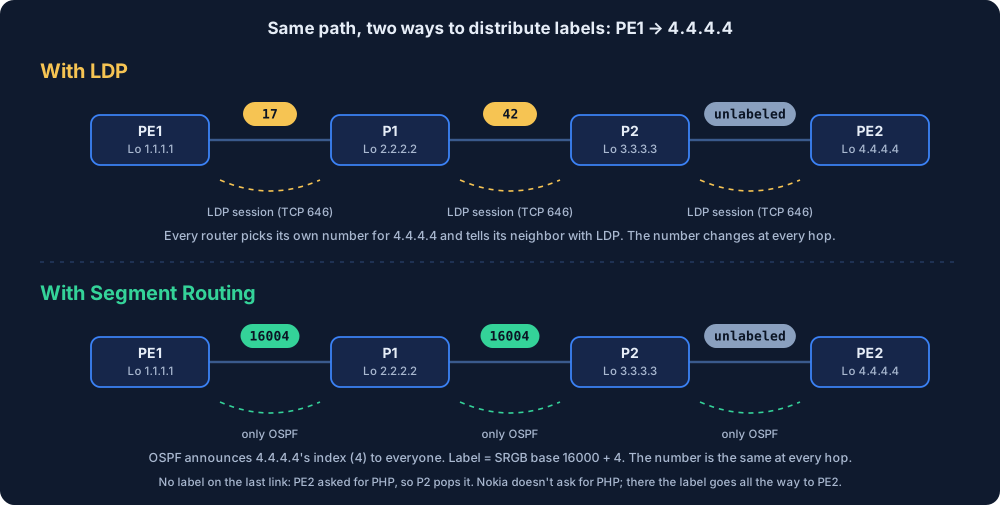
- PE1 (push): “4.4.4.4’s index is 4, the next router P1’s base is 16000.” It pushes 16004 onto the packet.
- P1 (swap): Looks at the incoming 16004. Its table says “16004 → to P2, as 16004”. The swap operation is still done, it’s just that the new number is the same as the old one.
- P2 (pop or swap): It’s the hop before PE2. If PE2 advertised its SID asking for PHP (usually the default on Cisco and Huawei), P2 removes the label (PHP, penultimate hop popping) and the packet goes to PE2 as plain IP. If PE2 is a Nokia, things change: Nokia always advertises its own SIDs with “don’t pop” (the NP-flag). Then P2 doesn’t pop; it hands the packet to PE2 with 16004 and PE2 removes the label. The “unlabeled” last link in the figure shows the PHP case.
With LDP, the numbers along the same path were independent of each other, like 17 and 42. With SR, you understand the destination when you see the number: if it’s 16004, it’s going to PE2.
6. Who distributes the labels?
When SR is turned on, OSPF announces two more things next to the normal routing information:
- Router information: “My SRGB is 16000–23999.” (in OSPFv2, inside the Router Information LSA)
- Prefix information: “The index of 4.4.4.4/32 is 4.” (inside the Extended Prefix LSA, as a Prefix-SID)
These are carried inside OSPF’s opaque LSAs (RFC 8665 for OSPF, RFC 8667 for IS-IS). So OSPF distributes Prefix-SID and SRGB information alongside the topology information. This lets routers build their MPLS forwarding entries themselves, without needing a separate LDP session. That’s why the section 2 problem of “OSPF moved to a new path but the LDP label hasn’t arrived on it yet” doesn’t happen: there’s no second protocol to wait for.
But saying “if OSPF knows a path, it also knows its label” would be wrong. A labeled entry also needs the required SR information to be valid and usable:
- The destination needs a Prefix-SID. Delete the SID and the OSPF route stays, but traffic goes unlabeled. We’ll try this on purpose in section 11.
- The next hop must support SR and must have advertised its SRGB. The index also has to fit inside that SRGB, otherwise the label can’t be calculated.
- SIDs must not conflict. If two prefixes get the same index, one of them is left without a SID (section 11 again).
Careful: the path is still OSPF’s shortest path. In this post SR only takes over the job of building the labeled paths from LDP, it doesn’t change path selection.
An LDP label and a SID are not the same thing
Both end up putting an MPLS label on the packet, so it’s easy to think they’re the same. But what gets distributed is different:
| LDP | SR-MPLS | |
|---|---|---|
| What is advertised? | A label (label mapping) | A SID, usually an index |
| Who, to whom? | Every router tells its neighbors the label it picked for a FEC (e.g. 4.4.4.4/32) | The router that owns the prefix advertises it to the whole domain through the IGP |
| Meaning of the value | Valid only for the router that picked it | The index is the same across the domain |
| How does a router find its own incoming label? | It picks it | Its own SRGB base + index |
| How does it find the outgoing label? | The label the next-hop neighbor told it | The next hop’s SRGB base + index |
| What can it be used for? | Reaching a destination over the IGP shortest path | Reaching a destination, and also describing a path with several segments |
In short, keep three things in mind:
- With LDP, the downstream router advertises a label binding for the FEC. The message itself is a label.
- With SR-MPLS, what travels in the IGP is not a label but a global Prefix-SID. The actual MPLS label value is calculated using the relevant router’s SRGB.
- SR isn’t only for pointing at a destination. It can also build a path by stacking segment instructions one after another. SR Policy and traffic engineering are built on this.
Once these three click, everything falls into place when we move on to SR-TE later in the series.
7. Setting it up on Nokia
The core is four routers: PE1 – P1 – P2 – PE2. OSPF and the loopbacks are ready, and LDP is running right now. We set up SR next to LDP without turning LDP off, and then we’ll remove LDP. That’s how the migration is done in a real network too.
The same three steps on every router (the index changes per router, 1 for PE1):
configure router mpls-labels sr-labels start 20000 end 27999

configure router ospf
    advertise-router-capability area
    segment-routing
        prefix-sid-range global
        no shutdown
    exit
    area 0.0.0.0
        interface "system"
            node-sid index 1
        exit
    exit
Line by line, in plain words:
mpls-labels sr-labels start 20000 end 27999: reserve a range. The label numbers a router can use are a pool, and LDP uses part of it. This line says “20000–27999 belongs to SR, nobody else touches it”. This range is the SRGB. On Nokia it doesn’t exist by default, and SR doesn’t come up without it.advertise-router-capability area: introduce yourself. When neighbors send you a packet, they calculate the label from your range. So the information “my range starts at 20000” has to reach everyone. This line makes OSPF publish an information card about the router itself (the Router Information LSA), and the SRGB travels on this card. Theareaat the end says how far the card spreads, it has nothing to do with the path.segment-routing: the SR sub-menu. It doesn’t turn anything on by itself, the next two lines go inside it.prefix-sid-range global: say which range to use. It means “use the general range I reserved in step 1”. This router’s SRGB becomes 20000–27999, and the biggest index you can give is 7999.no shutdown: turn it on. On Nokia most features come disabled, this line turns SR on in this OSPF.node-sid index 1: write your number on the map. Gives index 1 to the system address (loopback). From now on, the other routers use this number when going to 1.1.1.1.
Two Nokia traps:
- Order matters. The moment you type
no shutdown, the router checks: is a range reserved, is the information card on? If router capability isn’t on,segment-routing no shutdowngives an error. The scope must also bearea. - A node SID is only given to a loopback. You can’t write
node-sidon a physical interface.
8. Verification: first side by side, then without LDP
The first command shows which SIDs OSPF has learned. On PE1:
A:PE1# show router ospf prefix-sids
===============================================================================
Rtr Base OSPFv2 Instance 0 Prefix-Sids
===============================================================================
Prefix               Area            RtrID           SID          Flags
-------------------------------------------------------------------------------
1.1.1.1/32           0.0.0.0         1.1.1.1         1            NnP
2.2.2.2/32           0.0.0.0         2.2.2.2         2            NnP
3.3.3.3/32           0.0.0.0         3.3.3.3         3            NnP
4.4.4.4/32           0.0.0.0         4.4.4.4         4            NnP
-------------------------------------------------------------------------------
No. of Prefix-Sids: 4
Four loopbacks, four indexes. Learned only from OSPF, without talking to anyone separately. In the Flags column N means “this is a node SID” and nP means “no-PHP”: Nokia marks its own SIDs so the second-to-last router doesn’t pop the label. You’ll see the effect in sections 5 and 10.
The really nice part is the tunnel table. On PE1, while LDP is still on:
A:PE1# show router tunnel-table
===============================================================================
IPv4 Tunnel Table (Router: Base)
===============================================================================
Destination       Owner     Encap TunnelId  Pref     Nexthop        Metric
-------------------------------------------------------------------------------
2.2.2.2/32        ldp       MPLS  65538     9        10.0.12.2      100
2.2.2.2/32        ospf (0)  MPLS  524289    10       10.0.12.2      100
3.3.3.3/32        ldp       MPLS  65539     9        10.0.12.2      200
3.3.3.3/32        ospf (0)  MPLS  524290    10       10.0.12.2      200
4.4.4.4/32        ldp       MPLS  65540     9        10.0.12.2      300
4.4.4.4/32        ospf (0)  MPLS  524291    10       10.0.12.2      300
There are two tunnels for every destination. The one with ldp in the Owner column was built by LDP, the one with ospf (0) is SR-OSPF. Same next hop, same metric, because the path is the same. The difference is in the Pref column: the smaller one is preferred, LDP is 9, SR-OSPF is 10. So setting up SR doesn’t move traffic to SR right away. You need to choose separately which tunnel the services use, and we’ll do that with a VPRN in the next post.
Now turn LDP off on all four routers:
configure router ldp shutdown
The tunnel table again:
Destination       Owner     Encap TunnelId  Pref     Nexthop        Metric
-------------------------------------------------------------------------------
2.2.2.2/32        ospf (0)  MPLS  524289    10       10.0.12.2      100
3.3.3.3/32        ospf (0)  MPLS  524290    10       10.0.12.2      200
4.4.4.4/32        ospf (0)  MPLS  524291    10       10.0.12.2      300
The LDP rows are gone, the SR rows are still there. The labeled path was never cut, because SR has no tie to LDP at all. As long as OSPF is up, the labels are up too.
Honest note: These outputs are from the simulator. The commands and columns were prepared according to Nokia’s classic CLI, but on a real vSIM some columns and flags (Flags) may look different. When I try it on a real device in my own lab, I’ll add the differences here.
9. The same setup on three vendors
I’m putting the same job (SRGB, SR in the IGP, index on the loopback) side by side on three vendors. Example PE1, loopback 1.1.1.1, index 1. I’m assuming OSPF is ready.
Cisco IOS-XE (CSR1000v / Catalyst 8000v):
segment-routing mpls
 global-block 16000 23999
 connected-prefix-sid-map
  address-family ipv4
   1.1.1.1/32 index 1 range 1
  exit-address-family
!
router ospf 1
 segment-routing mpls
Huawei VRP (NetEngine / CloudEngine):
mpls lsr-id 1.1.1.1
mpls
#
segment-routing
#
ospf 1
 opaque-capability enable
 segment-routing mpls
 segment-routing global-block 16000 23999
#
interface LoopBack0
 ospf prefix-sid index 1
Nokia SR OS (classic CLI):
configure router mpls-labels sr-labels start 20000 end 27999
configure router ospf advertise-router-capability area
configure router ospf segment-routing prefix-sid-range global
configure router ospf segment-routing no shutdown
configure router ospf area 0 interface "system" node-sid index 1
All three are made of the same four parts:
| Part | Cisco | Huawei | Nokia |
|---|---|---|---|
| Turn SR on in general | segment-routing mpls | segment-routing (+ mpls, mpls lsr-id) | (no separate command) |
| SRGB | global-block 16000 23999 (this is the default) | segment-routing global-block 16000 23999 (under OSPF) | mpls-labels sr-labels start ... end ... |
| SR in the IGP | router ospf → segment-routing mpls | ospf → opaque-capability enable + segment-routing mpls | advertise-router-capability area + segment-routing no shutdown |
| Index on the loopback | <prefix> index <n> inside connected-prefix-sid-map | interface LoopBack0 → ospf prefix-sid index <n> | interface "system" → node-sid index <n> |
Verification commands:
| Question | Cisco | Huawei | Nokia |
|---|---|---|---|
| Is SR on, what’s the SRGB? | show ip ospf segment-routing | display segment-routing prefix mpls forwarding | show router ospf prefix-sids |
| Which loopback has which index? | show segment-routing mpls connected-prefix-sid-map ipv4 | display segment-routing prefix mpls forwarding | show router ospf prefix-sids |
| Labels / tunnels | show mpls forwarding-table | display tunnel-info all | show router tunnel-table |
A few honest notes:
- Cisco: This syntax is for IOS-XE. Classic IOSv in GNS3 has no SR. On IOS-XR the structure is different: the index is written directly under
router ospf, on the loopback interface asprefix-sid index 1. Cisco prefers LDP labels by default. To make it prefer SR there’ssr-label-preferredundersegment-routing mpls→set-attributes→address-family ipv4. - Huawei: SR-MPLS is available on the NetEngine and CloudEngine series. I’m guessing these commands don’t exist on the AR routers in eNSP, but I haven’t tried it yet. When I do, I’ll write it here. For SR you don’t need to turn on
mplsseparately on the interfaces, the globalmplsandmpls lsr-idare enough. - Nokia: The commands are classic CLI. The paths are different in MD-CLI. Nokia wants the SRGB from somewhere outside the static label range. That’s why I used 20000–27999 in the lab.
- Simulator: All of these commands work on the routers in the simulator, and the interface names are the simulator’s names too.
10. What if the SRGBs are different?
In the simulator’s ready-made lab “SR: üç vendor, farklı SRGB” (three vendors, different SRGB), PE1 is Cisco, P1 is Nokia, P2 is Huawei, PE2 is Nokia. The index plan is the same, but the Nokias’ block starts from 20000, and Cisco’s and Huawei’s from 16000.
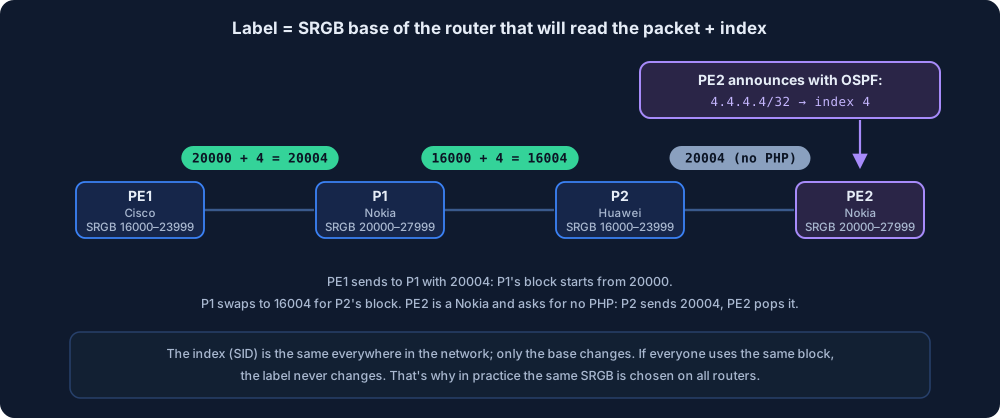
Try it yourself below: pick a scenario at the top and step the packet hop by hop with Next. First with the same SRGB everywhere, then with the Nokias starting at 20000, and watch how the label is worked out.
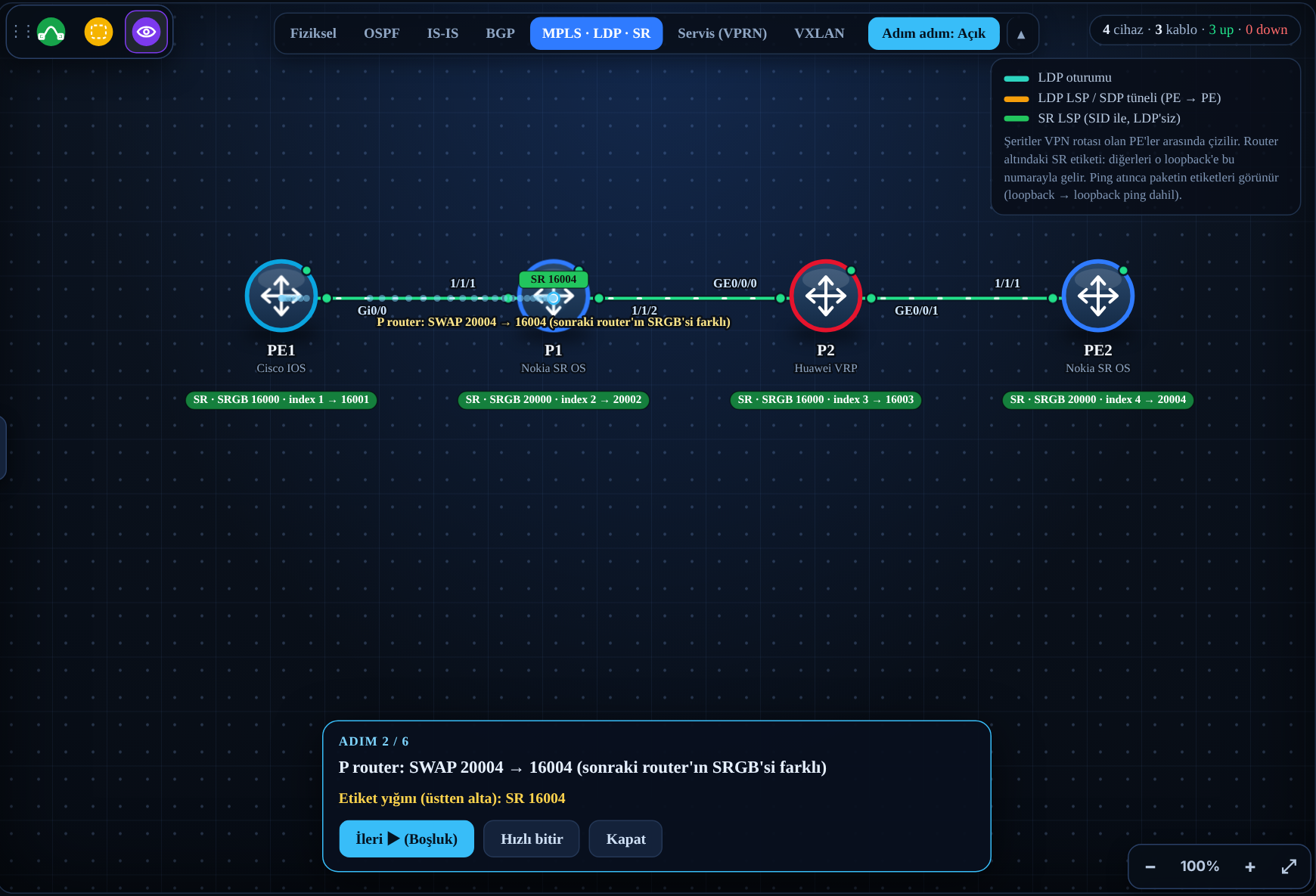
Ping 4.4.4.4 from PE1 and turn on Adım adım (step by step) mode:
- PE1 pushes 20004 onto the packet, because the one that will read the packet is P1, and P1’s base is 20000.
- P1 changes it to 16004 while handing the packet to P2, because P2’s base is 16000.
- P2 does not remove the label, because PE2 is a Nokia and advertises its SID without PHP. It swaps to 20004 for PE2’s block.
- PE2 removes its own SID label.
The subtle point to notice: without PHP, PE2’s SRGB matters at the last hop too. The label went 20004 → 16004 → 20004.
The index is 4 everywhere. Only the base changes. It works, but while reading tables you have to do the math, “what was this label again?”. That’s the reason the same SRGB is chosen across the whole core in practice.
11. Try it in the simulator
A warning up front: the simulator’s behavior, especially in error and conflict scenarios, may not give the same result on every real Nokia, Huawei and Cisco device. Use it to see the logic, and check the device documentation for release details.
On the Simulation page (Turkish UI), open the Nokia, Huawei or Cisco version of the Yeni → “Segment Routing: LDP’siz MPLS” lab. OSPF and SR are set up on four routers, there’s no LDP at all. When you open the MPLS · LDP · SR tab at the top, under every router you see its SRGB, its index and the label for that loopback:
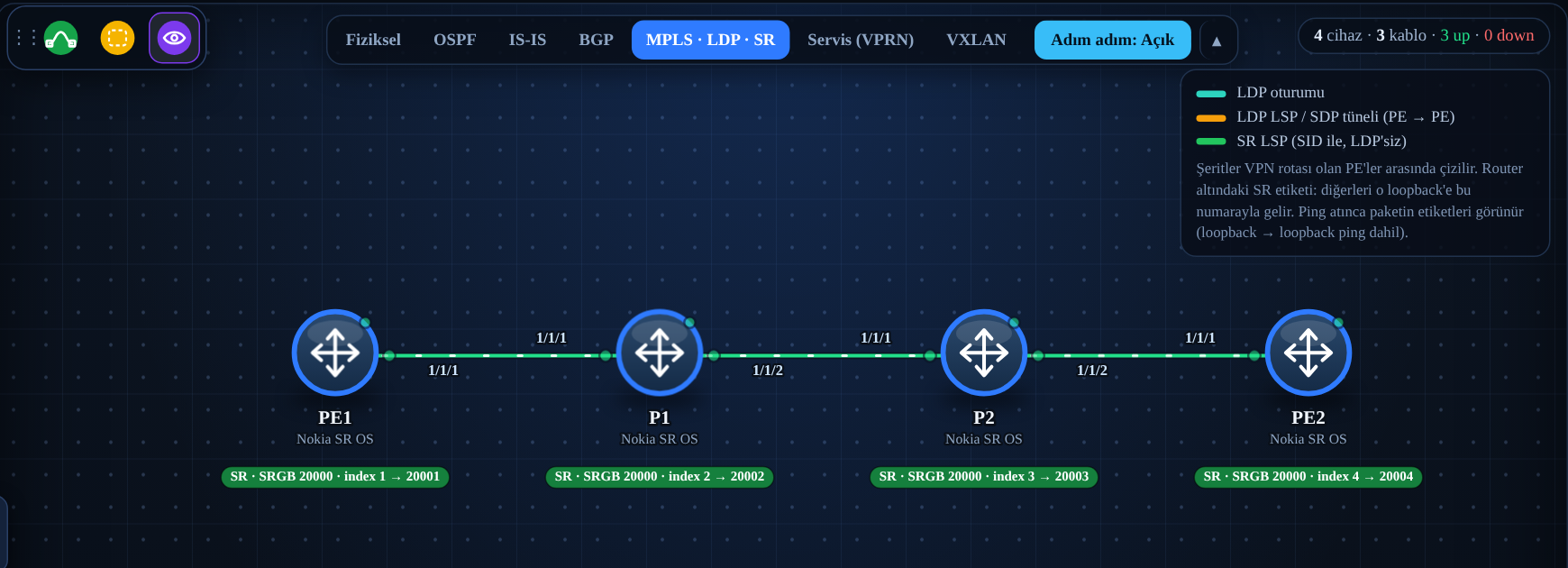
A few ideas to try:
- Run
ping 4.4.4.4from PE1 and follow the label in step-by-step mode: 20004 → 20004 → 20004, and PE2 removes it. Since Nokia advertises its SIDs without PHP, the last link carries a label too. In the Huawei and Cisco versions the same test pops the label on the last link (PHP). Then look at the tunnel table from section 8 on PE1. - Delete a SID: On PE2, type
configure router ospf area 0 interface "system" no node-sid. The 4.4.4.4 row disappears from PE1’s tunnel table. The ping still goes through, because the OSPF route is still there, but now it goes unlabeled. The SR path and the IP path are different things. - Create a conflict: Make P2’s index 4:
configure router ospf area 0 interface "system" node-sid index 4. Now 3.3.3.3 and 4.4.4.4 have the same index. The simulator follows the rule in the IETF conflict resolution draft. With two /32s of the same length, the smaller address wins. 3.3.3.3 gets index 4, and PE2 is left without a SID. You made the mistake on P2, and PE2 is the one that got hit. This is exactly why the SID plan is kept centrally. On real devices the conflict behavior can vary by release, but the result always ends up in the same place: something is left without a SID.
If you want a step-by-step, scored practice, the Labs section has a task-based version of the same migration (Turkish): Nokia, Huawei and Cisco. There, OSPF and LDP come ready. You set up SR next to LDP, then turn LDP off and prove that the path stays on SR, and at the very end you deliberately create a SID conflict and fix it.
12. Frequently asked questions
Is SR replacing MPLS? SR-MPLS is still MPLS. The label on the packet, push, swap and pop are the same. In the way this post uses it, what changes is the control plane: the labeled paths are built from SIDs distributed by the IGP instead of LDP. SRv6 uses the IPv6 header instead of labels, that’s a separate topic.
Can LDP and SR run at the same time? Yes, that’s exactly how the migration is done. As you saw in section 8, two tunnels form to the same destination, and the preference value or the service setting decides which one is used. If there are old routers that don’t know SR, a mapping server is used to announce SIDs on behalf of their loopbacks. That’s a topic for another post.
Why an index? Couldn’t the label be given directly?
Some vendors accept an absolute label too (absolute on Cisco, node-sid label on Nokia). But an index lets routers use different SRGBs. The mixed lab in section 10 works thanks to this.
Where’s the traffic engineering? That’s where SR’s real power is. The ingress router can push a list of labels onto the packet instead of a single label: “first go to P2, then exit through this link, then go to PE2.” The routers in between only look at the top label. Unlike RSVP-TE, no tunnel state is kept at every hop. This is called SR-TE, and it’s coming later in the series.
Is the SRGB decided per OSPF area or per OSPF instance?
Neither, it’s per router. It doesn’t change by area at all: the “area” in advertise-router-capability area is only the scope of the announcement. An ABR with legs in two areas announces the same SRGB into both, and carries prefix SIDs into the other area with the same index. Splitting it per instance is a separate mode on Nokia: instead of prefix-sid-range global, each OSPF instance gets a non-overlapping sub-range with start-label ... max-index .... In practice almost everyone uses a single IGP and a single block.
Does OSPF get heavier when SR is turned on? Not really. Every router adds a few more fields to its LSAs (the SRGB and its loopback’s index). In return, the LDP sessions kept open with every neighbor go away completely.
13. Summary
- In this post we used SR-MPLS in its simplest form: the labeled paths were built from SIDs distributed by the IGP instead of LDP. The data plane is the same MPLS.
- That’s not the definition of SR, just the starting point. With SR the source router can also define the packet’s path by stacking segments (SR-TE).
- LDP distributes a label, SR advertises a SID. The label value is calculated with the SRGB.
- An OSPF route alone isn’t enough: the destination’s SID and the next hop’s SRGB must be valid and conflict-free.
- The SID index is the destination’s fixed, network-wide number. The SRGB is the router’s label block. Label = the next router’s SRGB base + index.
- A SID given to a router’s loopback is called a node SID. Indexes must be unique, otherwise one of them is left without a SID.
- If the SRGBs are the same, the label stays the same at every hop (16004 → 16004 → …). In practice the whole core uses the same block.
- The destination router decides whether the label is popped at the last hop. Nokia advertises its SIDs with no-PHP; on Cisco and Huawei the default is usually PHP.
- LDP and SR can run side by side. When LDP is turned off, the SR tunnels stay up, because they only depend on the IGP.
- On Nokia, SR tunnels show up in the tunnel table with the
ospf (0)owner and by default come after LDP (Pref 10 versus 9).
In the rest of the series I’ll run the same VPRN over SR tunnels instead of LDP, and at the very end I’ll move on to EVPN. For the whole series, see the MPLS from Scratch page (Turkish).
Sources
- RFC 8402: Segment Routing Architecture
- RFC 8665: OSPF Extensions for Segment Routing
- IETF draft: Segment Routing Conflict Resolution
- Nokia 7750 SR: Configuring Segment Routing in Shortest Path
- Cisco IOS XE: Segment Routing Configuration Guide (PDF)
- Huawei CloudEngine 12800: SR-MPLS BE configuration examples